How to Build WordPress Plugins with AI: The 2026 Developer’s Guide (From Zero to Ship)
I’ll be honest with you: the first time I tried to build WordPress plugins with AI, I thought I’d be done in twenty minutes. I opened ChatGPT, typed in a prompt asking for a “simple block that displays a random quote,” and watched the code pour out. It felt like magic.
Then I pasted it into my file, activated the plugin, and… nothing. No errors, just silence. The block wouldn’t render.
That “twenty-minute” project turned into a weekend of debugging. I fell into what experts call the “shiny toy” trap—chasing the magic of generation without understanding the architecture. I learned the hard way that while AI can write code, it doesn’t inherently know your specific project context or the nuanced best practices of the WordPress ecosystem unless you guide it with surgical precision.
If you are looking to harness AI for WordPress development, you are in the right place. Drawing from the experiences of developers who have spent hundreds of hours prototyping, failing, and eventually shipping AI-generated plugins, this guide will walk you through the real workflow. We’re moving beyond simple prompts and into the professional realm of context-aware coding, security hardening, and deployment.
Table of Contents
Why This Tutorial Matters in 2026: WordPress Is Massive, Plugins Are Everywhere
Let’s ground this in reality:
- WordPress powers a huge chunk of the internet. W3Techs’ live usage stats report WordPress is about 43% of all websites, and roughly 60% of sites with a known CMS. (w3techs.com)
- The plugin ecosystem is enormous. WordPress’ own “State of the Word 2025” recap says the plugin directory surpassed 60,000 plugins, and downloads were on pace to hit 2.1 billion in a single year. (WordPress.org)
- That scale is awesome… and it also means your plugin lives in a world where security mistakes get punished fast.
If you’re going to ship a plugin—even a small one—you want a workflow that nudges you into best practices automatically.
That’s what we’re doing here.
The WordPress Reality: Scale & Security
Let’s ground this in reality with data from the WordPress ecosystem
Market Dominance
Plugin Ecosystem
Security Reality
⚠️ The Double-Edged Sword of Scale
WordPress powers 43% of the entire web with an ecosystem of 60,000+ plugins downloaded 2.1 billion times annually. This massive scale creates an equally massive attack surface where 96% of vulnerabilities originate from plugins, facing billions of automated attacks each year.
The Reality Check: AI as a Power Tool, Not a replacement
Before we open our code editors, let’s look at the data. Developers utilizing AI assistants are reporting 40-55% faster task completion rates. That is massive. However, there is a catch. The gap between going from “zero to functioning plugin” is small, but the gap between a “functioning plugin” and a “submission-ready plugin” is enormous.
One developer, Martin Dubovic, documented his journey of building his first plugin with no prior experience. He expected a quick win but ended up spending 120 hours on the project. Why? Because while the AI could generate the PHP, it struggled with the architectural decisions, leading to “spaghetti code” that required massive refactoring.
The lesson here is simple: AI is a power tool. In the hands of a craftsman, it builds faster. In the hands of a novice without guidance, it builds a house that might collapse when the wind blows.
You might want to read these: How Build0 Uses AI to Generate Secure Internal Tools in Minutes
The Biggest AI Trap in WordPress Plugin Development: Copy-Paste Coding Without Guardrails

AI can write WordPress code in seconds. And that’s exactly the danger.
In Wordfence’s 2024 annual WordPress security report, they found:
- Plugins accounted for 96% of disclosed vulnerabilities
- Wordfence blocked 54 billion malicious requests and 55 billion password attacks in 2024
- They blocked 9 billion XSS attempts and 1.1 billion SQL injection attempts
- Cross-site scripting was the most disclosed vulnerability type (Wordfence)
WordPress Security Threat Landscape
AI can write WordPress code in seconds. And that’s exactly the danger.
🔌 Plugin Vulnerabilities
of disclosed vulnerabilities in WordPress were attributed to plugins.
Wordfence 2024 Annual Security Report
🛡️ Attacks Blocked
malicious requests blocked by Wordfence in 2024.
Plus 55 billion password attacks
⚠️ Top Vulnerability
Cross-site scripting was the most disclosed vulnerability type.
Wordfence 2024 Annual Security Report
Attack Attempts Blocked in 2024
That’s not “scare marketing.” It’s a very practical reminder: a missing nonce check, an unescaped output, or a sloppy capability check can turn a “simple feature” into a security incident.
So the goal isn’t “use AI to code faster.”
The goal is: use AI to follow a safe, disciplined build process—faster.
Other Ways to Build This Plugin and Why We’re Not Choosing Them
You can build a plugin in other legitimate ways, like:
- Using a heavy “plugin boilerplate” starter (often with more structure than you need)
- Building with Composer + an autoloader + a framework-like architecture
- Shipping it as a block-first plugin with React build tooling
- Using a form plugin + CPT plugin + shortcode plugin and “gluing” them together
Those can work. But for beginners (and honestly, for many real-world client projects), they often add friction: more dependencies, more moving parts, more breakpoints when WordPress updates.
In this tutorial, we’re choosing a method that hits the sweet spot:
- WordPress-native APIs
- Lightweight modular structure
- Security-first defaults
- Small steps with a test loop
Which brings us to the prompt.
Step 1: The Stack – Choosing Your AI Copilot to build WordPress plugins with AI

In 2026, we aren’t just copying and pasting from a web chat interface anymore. The most efficient workflows now happen directly inside your Integrated Development Environment (IDE) by using AI coding assistants.
The Big Players
- Cursor AI & GitHub Copilot: These are the heavy hitters for serious development. Their “killer feature” is context. Unlike a web chat, these tools can see your entire file structure. If you ask Cursor to “make this plugin compatible with the AI Services plugin,” it scans your existing files to understand how to hook into them.
- Telex (formerly CodeWP): This is a specialized tool trained specifically on WordPress, WooCommerce, and popular plugin codebases (like Gravity Forms). It is less likely to hallucinate generic PHP functions and more likely to give you the correct WordPress hooks (e.g.,
add_actionvs.add_filter). - ChatGPT / Claude: These are still excellent for high-level architecture planning, debugging specific error messages, and generating documentation. Claude, in particular, is noted for its ability to handle large context windows and explain complex logic.
- Using VS code IDE with AI extension integration.
My recommendation? Use a hybrid approach. Use Claude to plan your architecture and Cursor to write the actual code within your editor.
Step 2: Planning – The Step You Can’t Skip
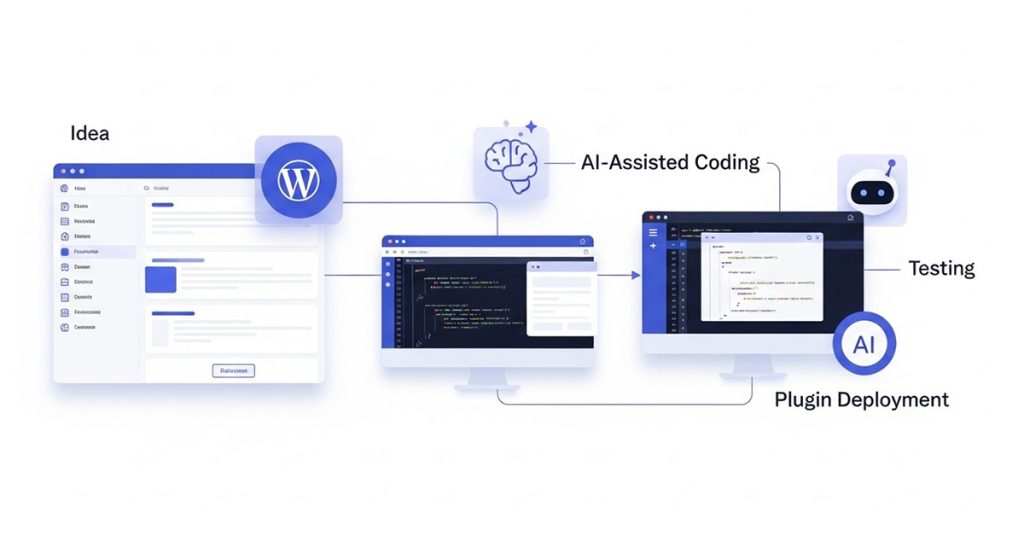
The biggest mistake developers make is rushing to code for an AI WordPress plugin. When using AI, planning is programming.
If you tell an AI to “make a contact form plugin,” it will give you a minimal viable snippet. It won’t think about user permissions, database optimization, or admin interfaces unless you tell it to.
Create a “Context File”
This is a game-changer. Before you write a line of code, create a text file (often called .cursorrules or project_context.md) in your project root. This file tells the AI how to behave.
What to include in your context file:
- The Goal: “We are building a plugin that creates a custom post type for ‘Events’.”
- The Tech Stack: “Use PHP 8.1+, WordPress 6.4+, and React for the block editor.”
- Coding Standards: “Follow WordPress Coding Standards. Use BEM naming for CSS. Use Tabs, not spaces.”
- Security Rules: “Always use nonces for forms. Escape all outputs using
esc_htmloresc_attr. Sanitize all inputs.”
By feeding this context to the AI at the start of every session, you prevent it from generating generic, insecure, or outdated code.
Here is the main prompt I use in my VS code interface during planning stage.
WordPress Plugin Development Copilot

1) Environment

We are inside the plugin folder: wp-content/plugins/<plugin-slug>/

Git repo initialized + connected to GitHub.

Local WordPress site running.

My OS: (if not provided, ask once and continue after I answer)
My local stack: (LocalWP / XAMPP / MAMP / Docker / other)

Rules

Adapt paths + shell commands to my OS.

Prefer WP-CLI when helpful, but provide manual alternatives.

2) Your Role & Output Style

Act as a senior WordPress plugin engineer.

Output rules

Work in small, testable steps (1–3 files per step).

Each step includes:

Goal

What to change (file paths + code)

Why it’s needed

Quick “how to test” checklist

Follow WordPress Coding Standards.

Never dump the whole plugin at once.

3) Hard Requirements (Non-Negotiable)

Security: nonces, capability checks, sanitization, escaping.

Use WP APIs (CPT, Settings API, admin screens, shortcodes, etc.).

No heavy frameworks, no Composer required.

Enqueue scripts/styles only when needed.

Add:

uninstall.php cleanup behavior

text domain + translation-ready strings

activation/deactivation hooks (flush rewrites correctly)

consistent prefix/namespace to avoid collisions

4) Architecture & Folder Structure

Use a lightweight modular structure:

plugin-slug.php (main bootstrap)

/includes (core classes, helpers)

/admin (admin-only classes, screens)

/public (shortcodes, frontend handlers)

/assets (js/css)

/languages (optional)

Use a single plugin “bootstrap” class that wires hooks. Keep classes small.

5) Workflow

Create folder structure + base files.

Implement core data model (CPT + meta).

Frontend submission form + validation + storage.

Admin review/approve/reject + edit.

*if you need) Shortcode display of (a feature)

Settings (toggle rating).

Hardening: escaping, permissions, uninstall, i18n.

Final pass: README + test checklist.

6) Plugin Idea: [Your plugin idea e.g. "fancy table of contents wordpress plugin"]

Purpose
e.g. WordPress post table of contents. Admin manually adds to the posts or auto add option to all the posts...

Frontend

[*your requirements]

Nonce + validation

Success/error messages

Shortcode: [e.g. fancywptof]

Admin

Menu: “Fancy TOC” (add your idea here)

View Pending / Approved (add you idea here)

Approve / Reject (add your idea here)

Email visible to admins only, never public

Storage

CPT: TOC

Table of content in post meta

Email in post meta (admin-only display)

7) Before you start (ask once)

Ask me these only once, then start Step 1:

Should approvals be done via custom post statuses (recommended) or a custom table screen?

Should the submission create posts as pending or draft?

Should logged-out users be allowed to submit? (default: yes, with anti-spam measures)

Do we need basic anti-spam (honeypot / time-based check) without external services?
Step 3: The “Brick-by-Brick” Build Process
Don’t try to generate the whole plugin in one prompt. It leads to hallucinations and logic errors. Instead, adopt a modular workflow.
1. Scaffold the Boilerplate
Start with the directory structure.
- Prompt: “Act as a senior WordPress developer. Create a directory structure for a plugin named ‘your idea e.g. Fancy Table of Contents’. Include folders for
includes,assets/css,assets/js, andtemplates. Generate the main plugin PHP file with the correct header comment block.”
2. Build Core Functionality (The “MVP”)
Focus on one feature at a time. If you are building a custom post type (CPT), get that registering and working before you worry about the frontend display.
- Actionable Tip: Use “Chain of Thought” prompting. Ask the AI to “Think step-by-step and explain your logic before writing the code.” This often forces the model to catch its own logic errors before it outputs bad code.
3. The Interface (Admin & Frontend)
This is where AI shines. Writing HTML forms and admin settings pages is tedious.
- Prompt: “Create a settings page under the ‘Settings’ menu. Include a text field for ‘API Key’ and a checkbox for ‘Enable Dark Mode’. Use the WordPress Settings API. Ensure all inputs are sanitized using
sanitize_text_field.”
Warning: Watch out for CSS. AI tends to write “classroom CSS” (e.g., generic class names like .container). Explicitly instruct it to use BEM (Block Element Modifier) methodology (e.g., .fancytoc-card__title) to avoid conflicts with themes.
Step 4: Security – Where AI Fails
You cannot blindly trust AI-generated code—not yet. Studies and audits on AI-generated plugins have revealed significant security gaps.
The “Hallucination” of Security
AI models sometimes “forget” to include nonces (security tokens) or capability checks.
- Direct Prompt Injection: If your plugin uses a chatbot feature, researchers have found that many plugins fail to verify the integrity of message history. This allows attackers to forge conversation history and “inject” fake system prompts, potentially hijacking the bot’s behavior.
- Indirect Prompt Injection: If your plugin scrapes website content (like comments or reviews) to feed an LLM, malicious actors can hide instructions in those comments to manipulate your AI.
The Security Checklist

Run this audit on every AI-generated file:
- Capability Checks: Does every admin function check
current_user_can()? - Nonces: Do all forms and AJAX calls verify a nonce?
- Sanitization: Are inputs cleaned before hitting the database (e.g.,
sanitize_text_field,absint)? - Escaping: Is data cleaned before being output to the browser (e.g.,
esc_html,wp_kses_post)?
Pro Tip: Use the official Plugin Check plugin provided by the WordPress team. Run it against your AI-generated plugin. It will flag many standard violations that the AI missed.
Step 5: Testing and Debugging
Debugging with AI is often faster than writing the code. If you hit a bug, don’t just say “it doesn’t work.”
The “Console Log” Strategy
If your JavaScript isn’t working, ask the AI to inject console.log statements throughout the code to trace the execution flow. Open your browser’s inspector, reproduce the bug, and paste the console output back into the AI.
Database Debugging
Sometimes the code looks perfect, but the data isn’t saving. Check your database (specifically the wp_options or wp_postmeta tables). One developer found that an AI-generated script was trying to save a setting with a typo in the key name. The code was valid, but the logic was flawed.
Step 6: Deployment and Maintenance
You’ve built it. It works. Now what?
Documentation
AI is incredible at writing documentation. Paste your final code into Claude or ChatGPT and ask it to: “Generate a readme.txt file following the WordPress.org repository standards. Include sections for Description, Installation, and Frequently Asked Questions.”
Updates
WordPress evolves. Functions get deprecated. You can paste your plugin code into an AI tool and ask, “Check this code for any functions deprecated in WordPress 6.5 or later.” This is a quick way to future-proof your work.
Final Thoughts: The “Centaur” Approach
The most successful developers in 2026 aren’t the ones letting AI do everything, nor are they the ones refusing to use it. They are “Centaurs”—a hybrid of human judgment and machine speed.
They use AI to prototype in minutes what used to take days. They use context files to keep the AI smart. But they use their own experience to review the security, ensure the user experience feels “native” to WordPress, and make the final architectural decisions.
So, go ahead and build that plugin. Just remember: you are still the pilot; the AI is just a very fast, occasionally hallucinating co-pilot.
FAQ
Can I build a WordPress plugin with AI if I don’t know how to code?
Yes, but with a major caveat. You can generate a functioning plugin, but you may struggle to troubleshoot it if it breaks or conflicts with other plugins. It is highly recommended to learn the basics of HTML, CSS, and how to read PHP so you can “audit” what the AI produces.
Which AI tool is best for WordPress development?
Telex (formerly CodeWP) is widely regarded as the best for specific WordPress tasks because it is trained on WordPress-specific codebases. Cursor and GitHub Copilot are superior for working within your actual code editor and understanding your specific project files.
Is AI-generated code secure?
Not by default. AI often skips security steps like sanitization (cleaning data) and nonces (verifying intent). You must explicitly prompt the AI to include these security measures and audit the code using tools like Plugin Check.
How do I stop AI from writing “spaghetti code”?
Use Context Files (like .cursorrules). Define your file structure, coding standards, and architectural goals before you ask for code. Ask the AI to refactor code into separate files (e.g., separating CSS/JS into an assets folder) rather than dumping everything into one big PHP file.
Can AI help me submit my plugin to the WordPress Repository?
Yes. AI can help you format your readme.txt, ensure your code follows the WordPress Coding Standards (WPCS), and even explain why your plugin might have been rejected during the review process so you can fix it.